What is the Claude Human Resources plugin?
The Human Resources plugin is an Anthropic-verified package that gives Claude ready-made HR workflows. It is designed to streamline recruiting, onboarding, performance reviews, compensation analysis, people reporting, policy guidance, and organization planning.
Instead of beginning every HR task with a blank conversation, the plugin adds specialized skills that understand the expected workflow and output. It may also use approved connectors to work with company knowledge in tools such as Gmail, Google Calendar, Slack, Notion, or Atlassian.
The plugin is an HR copilot—not an HR department, HRIS, payroll system, employment lawyer, or final decision-maker.
What can AI do in HR management?
AI in HR management is most useful when it prepares, organizes, summarizes, and checks work while accountable people retain judgment and approval. Claude’s HR plugin supports the following practical workflows.
| HR workflow | What Claude can help produce |
|---|---|
| Recruitment | Create job descriptions, interview plans, competency questions, scorecards, candidate communication, and recruiting-pipeline summaries. |
| Offer management | Draft offer letters and total-compensation summaries using terms approved by your company and reviewed by HR. |
| Onboarding | Build pre-boarding checklists, first-week schedules, 30-60-90 day plans, and manager responsibilities for each role. |
| Performance reviews | Structure self-assessments, manager reviews, evidence summaries, calibration notes, and development goals. |
| Compensation analysis | Create benchmarking frameworks, explain salary-band placement, and model scenarios using approved and anonymized data. |
| People reporting | Turn HR data into headcount, attrition, diversity, hiring, and organizational-health reports for leadership. |
| Policy guidance | Summarize approved policies in plain language and explain which source section supports the answer. |
| Organization planning | Support headcount plans, role clarity, reporting-line reviews, and team-structure scenarios. |
How to install the Claude HR plugin
Anthropic’s current instructions say plugins are available on paid Claude plans. The bundled skills work in Claude on the web, Claude Desktop, and Cowork; some advanced plugin features may work only in Cowork.
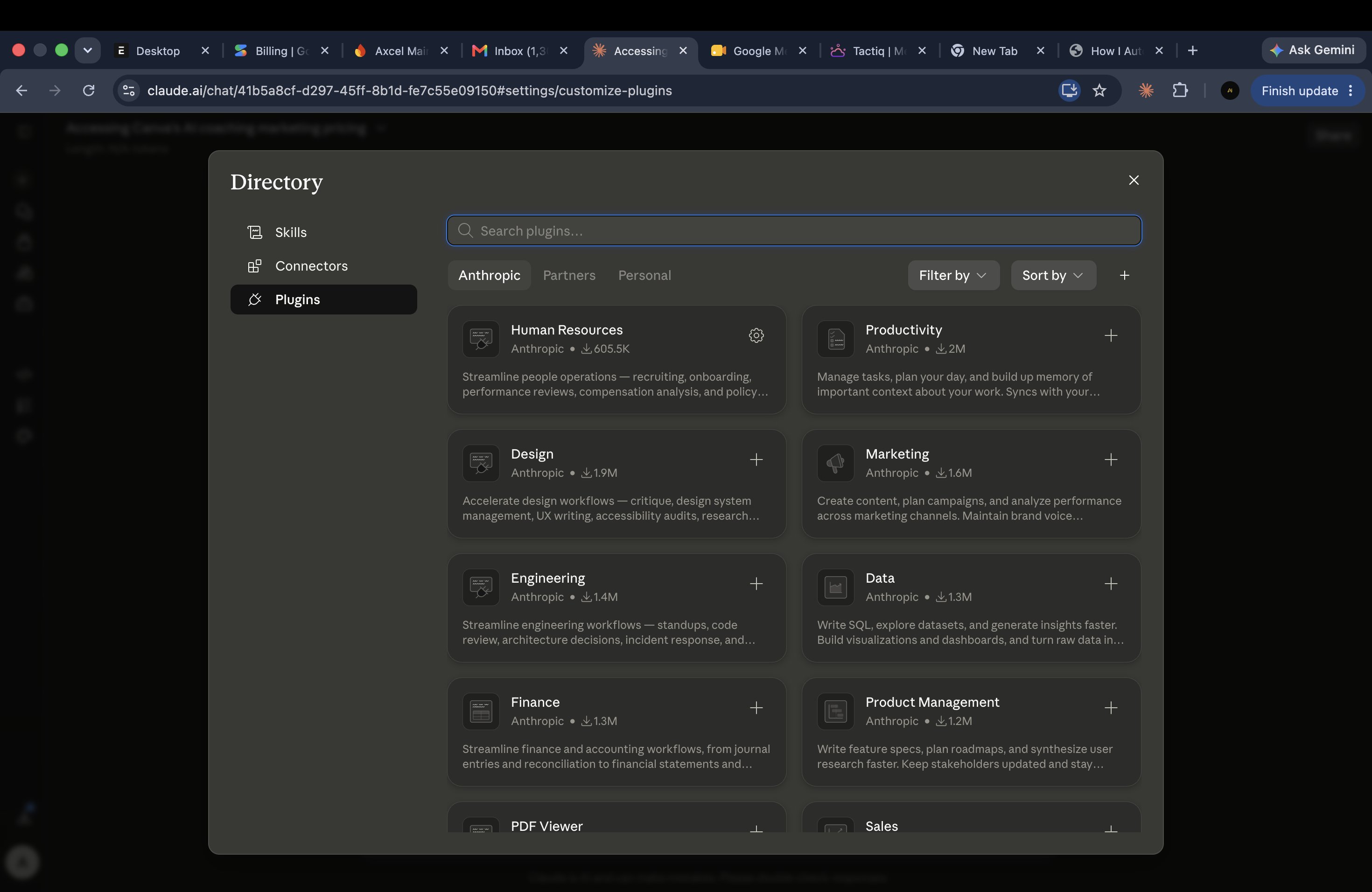
Access Claude
Sign in to Claude on the web or open the Claude desktop app. Plugins are available on paid Claude plans.
Open Customize
Use the left sidebar to open Customize. If you are working in Cowork, open Cowork first and then select Customize.
Browse Plugins
Open the Plugins tab, choose Browse plugins, and search for “Human Resources” or “HR”.
Install Human Resources
Open the Human Resources plugin by Anthropic and select Install. Check that the plugin is enabled after installation.
Run a safe test
Start with a low-risk task, such as creating a generic onboarding checklist, before connecting company data or using employee information.
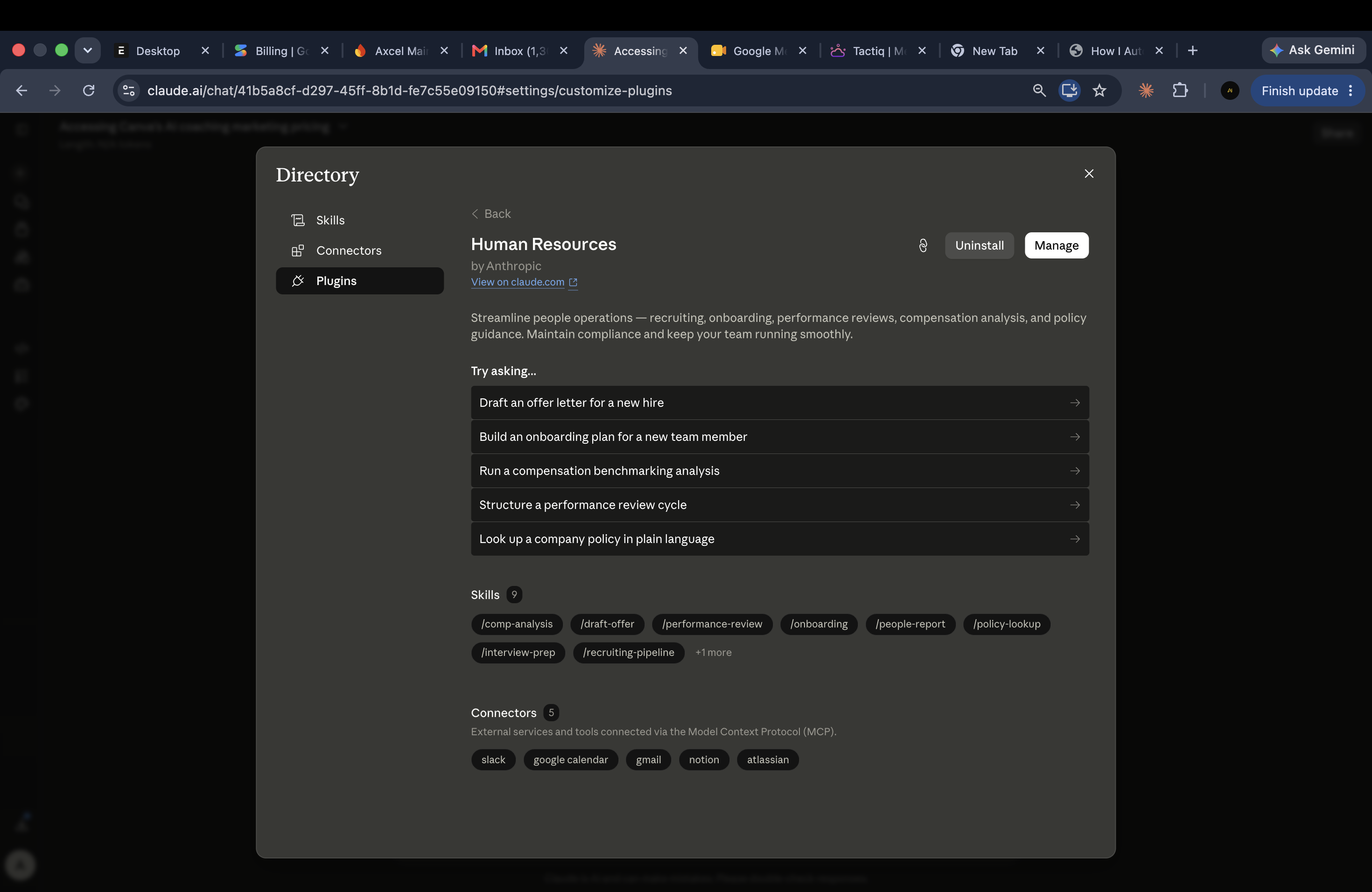
After installation, type / or use the + button in a Claude conversation to view available skills. The plugin can also activate a relevant skill automatically. See Anthropic’s official plugin guide if the menu differs on your account.
How to customize the HR plugin for your company
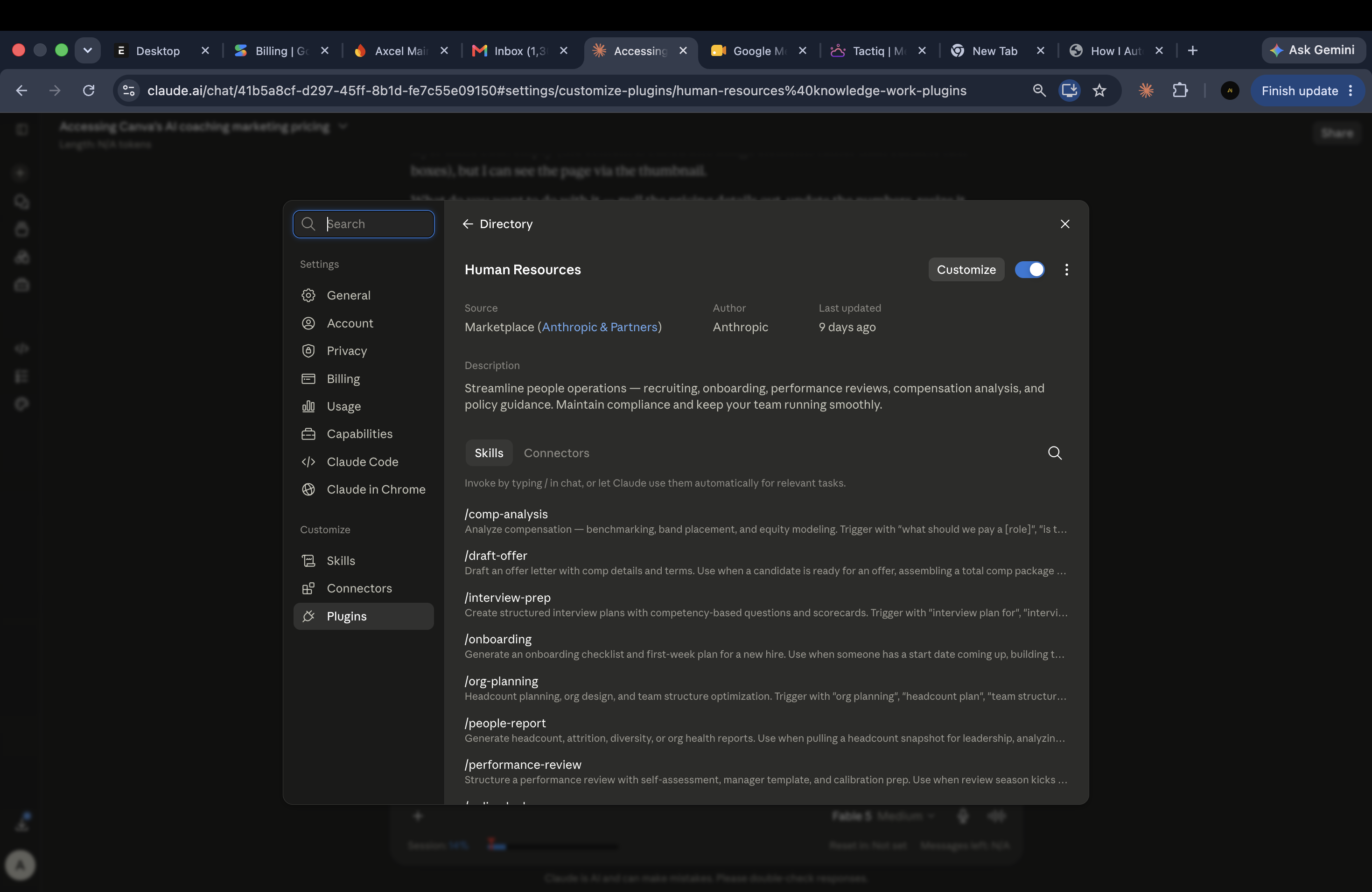
In Cowork, open the installed Human Resources plugin and select Customize. Claude will open a guided task where you can adjust skills and connectors. Before you begin, collect the approved information below.
1. Define the company context
- Company name, industry, locations, working model, and employee count.
- Departments, reporting lines, job families, levels, and company terminology.
- Company values, communication style, date format, languages, and accessibility needs.
- The jurisdictions that apply to each employment population. Have qualified HR or legal reviewers validate compliance content.
2. Map each HR workflow
- Trigger: what starts the process?
- Required inputs: what information is necessary?
- Owners: who prepares, reviews, approves, and receives the result?
- Decision rules: what is allowed, prohibited, or escalated?
- Output: which template, fields, and format are required?
- Evidence: what proves the step was completed?
3. Add approved source documents
Use current, versioned sources such as the employee handbook, leave policy, code of conduct, job architecture, compensation philosophy, approved offer templates, onboarding checklist, review framework, and organization chart. Name the document owner and effective date. Archive superseded versions so Claude does not mix old and new rules.
4. Configure connectors with minimum access
Connect only the services required for a defined workflow. For example, Calendar can help build interview schedules, Notion or Atlassian can supply approved policy knowledge, and Slack or Gmail can support reviewed communications. Check what each connector can read or change, use the least privilege available, and test with non-sensitive data first.
5. Add human approval gates
Require explicit HR review for offers, compensation, performance evaluations, employee relations, policy interpretation, disciplinary action, termination, and any communication with legal or reputational impact. Claude should identify missing evidence and risks; it should not silently complete a consequential employment decision.
Copy-and-paste company customization prompt
Customize the Human Resources plugin for our company. Ask me for any missing information before changing its skills or connectors.

COMPANY CONTEXT
- Company: [COMPANY NAME]
- Industry: [INDUSTRY]
- Locations and applicable jurisdictions: [COUNTRIES / STATES]
- Employee count: [NUMBER]
- Working model: [ONSITE / HYBRID / REMOTE]
- Departments and reporting structure: [SUMMARY]
- Company values: [VALUES]

HR OPERATING MODEL
- Recruitment stages: [STAGES]
- Interview and approval owners: [OWNERS]
- Offer approval rules: [RULES]
- Onboarding milestones: [PRE-BOARDING / DAY 1 / WEEK 1 / 30-60-90 DAYS]
- Performance-review cycle: [FREQUENCY AND PROCESS]
- Compensation philosophy and bands: [APPROVED SUMMARY]
- HR policies and source-of-truth documents: [LOCATIONS]
- Required HR reports: [REPORTS, FIELDS, FREQUENCY]
- Escalation contacts: [ROLES, NOT PERSONAL DATA]

OUTPUT AND GOVERNANCE RULES
1. Use our terminology, tone, templates, approval sequence, and date format.
2. Treat our approved HR documents as the source of truth. Cite the document title and section when answering a policy question.
3. Never invent a policy, legal requirement, salary benchmark, employee fact, or approval.
4. Mark missing or conflicting information clearly and ask HR to resolve it.
5. Do not make final hiring, promotion, pay, disciplinary, or termination decisions.
6. Minimize personal data. Do not request medical, disability, identity-document, bank, or other highly sensitive information unless our approved workflow explicitly requires it.
7. Flag outputs that require HR or legal review before use.
8. Separate facts, assumptions, risks, and recommended next actions.

CONNECTORS
Recommend only the connectors needed for our workflow. For each connector, explain what information it can access, the minimum permission needed, who should own it, and how we can test it safely.

DELIVERABLE
First, summarize the proposed customization. Then list the skills or instructions you will change, the documents and connectors required, the approval checkpoints, and five acceptance tests. Wait for my approval before applying the changes.
Usable AI prompts for HR management
Replace every bracketed field, remove information the task does not require, and ask a responsible HR owner to review the result before it affects an employee or candidate.
Recruitment and structured interview prompt
Act as an HR recruiting partner. Create a structured hiring pack for [ROLE] in [DEPARTMENT] at [COMPANY].

Context:
- Location and working model: [DETAILS]
- Reports to: [ROLE]
- Business outcome expected in the first 12 months: [OUTCOME]
- Essential competencies: [LIST]
- Must-have requirements: [LIST]
- Trainable requirements: [LIST]
- Interview stages and owners: [LIST]

Produce:
1. An inclusive job description without inflated or unnecessary requirements.
2. A competency-based interview plan with the same core questions for every candidate.
3. A scorecard with observable evidence for ratings 1–5.
4. Red flags that require follow-up, not automatic rejection.
5. A candidate communication sequence.

Do not infer protected or sensitive characteristics. Do not make a final hiring decision. Flag any requirement that may introduce avoidable bias.
Employee onboarding prompt
Create a role-specific 30-60-90 day onboarding plan for a new [ROLE] joining [COMPANY] on [DATE].

Use these inputs:
- Manager: [ROLE]
- Team and key collaborators: [LIST]
- Systems and access required: [LIST]
- Policies and training required: [LIST]
- First-quarter outcomes: [LIST]
- Check-in schedule: [DETAILS]

Organize the plan into pre-boarding, day one, week one, days 1–30, days 31–60, and days 61–90. For every task include the owner, due date or timing, expected output, and completion evidence. Add manager check-ins, role-learning goals, relationship-building activities, and measurable success indicators. Identify missing information instead of guessing.
Performance review prompt
Prepare a fair performance-review draft for [ROLE] covering [REVIEW PERIOD].

Inputs:
- Approved role expectations and goals: [PASTE]
- Documented outcomes and metrics: [PASTE]
- Employee self-assessment: [PASTE]
- Manager and peer feedback: [PASTE]
- Company competency framework: [PASTE]

Create:
1. An evidence table linking each conclusion to a supplied fact.
2. Balanced strengths and development areas.
3. Draft review language in a specific, respectful tone.
4. Three measurable development goals with support required.
5. Questions for the manager where evidence is missing or contradictory.

Do not infer intent, personality, health, family circumstances, or protected characteristics. Do not recommend promotion, pay, discipline, or termination. Label unsupported statements and send the draft for manager and HR review.
HR policy lookup prompt
Answer this employee question using only the approved policy documents available to you: “[QUESTION]”

Return:
- A plain-language answer in 3–5 sentences.
- The policy name, version or effective date, and exact section used.
- Eligibility rules, exceptions, deadlines, and required approvals.
- What is not answered by the available policy.
- The correct HR contact or escalation route.

If policies conflict, are outdated, or do not cover the situation, do not guess. State that HR review is required. Do not present the response as legal advice.
People analytics and HR reporting prompt
Create an anonymized monthly people report for [MONTH / PERIOD] for [LEADERSHIP AUDIENCE].

Approved fields: [LIST]
Reporting definitions: [HEADCOUNT / HIRE / EXIT / ATTRITION DEFINITIONS]
Comparison periods: [LIST]
Minimum group size for reporting: [NUMBER]

Include headcount, hires, exits, voluntary attrition, open roles, time to fill, onboarding completion, absence or engagement measures if approved, and notable changes. Show the formula and source period for each metric. Separate observations from possible explanations. Suppress small groups and identifying details. End with three questions leadership should investigate; do not claim causation from correlation.
A safe rollout plan for AI in HR
- Start with drafting: use a generic onboarding plan, job-description rewrite, or policy summary.
- Set a baseline: record current time, error rate, review effort, and stakeholder satisfaction.
- Test on fictional or anonymized data: verify accuracy, tone, completeness, citations, and escalation behavior.
- Pilot one workflow: choose a low-risk team and keep every result in human review.
- Audit the outcome: look for incorrect facts, inconsistent treatment, privacy exposure, bias, and over-reliance.
- Scale with ownership: name the skill owner, source-document owner, approver, review frequency, and incident route.
HR AI governance checklist
- Use an approved business account and follow company security policy.
- Collect and share only the minimum personal data needed for the task.
- Anonymize or aggregate employee data whenever individual identity is unnecessary.
- Do not use AI to infer protected characteristics, health, intent, honesty, emotion, or personality.
- Apply consistent job criteria and provide meaningful human review for consequential decisions.
- Verify policies and employment-law requirements with current official sources and qualified reviewers.
- Record prompt version, source documents, reviewer, approval, and changes for sensitive workflows.
- Provide a route for employees or candidates to question and correct important information.
Frequently asked questions about AI in HR management
What is the Claude Human Resources plugin?
It is an Anthropic-verified Claude plugin that packages HR-focused skills and optional connectors for recruiting, onboarding, reviews, compensation analysis, people reporting, policy guidance, and organization planning.
Is the Claude HR plugin an HRIS?
No. It helps Claude perform defined HR knowledge-work tasks, but it does not replace an HRIS, payroll system, applicant tracking system, legal counsel, or accountable human decision-makers.
Can I customize the HR plugin for my company?
Yes. In Cowork, open the installed plugin and select Customize. Give Claude your approved processes, templates, terminology, source documents, connector rules, and review checkpoints.
Should AI make hiring or termination decisions?
No. Use AI to organize evidence, draft materials, and surface questions. A qualified person should make and document consequential employment decisions after checking accuracy, fairness, policy, and applicable law.
Which HR data should I avoid sharing?
Avoid unnecessary personal or sensitive information. Anonymize or aggregate data where possible, use approved company accounts and connectors, apply least-privilege access, and follow your organization’s privacy and retention rules.
The practical takeaway
The Claude HR plugin is most valuable when it is customized around a real operating system: approved sources, clearly mapped workflows, limited connector access, structured prompts, and named human approvers. Begin with low-risk drafting, prove the workflow, then expand only where accuracy, fairness, privacy, and accountability can be maintained.